Phil Taylor who has been one of the leading developers in the ACES group at Microsoft is leaving to work at Intel. His last day was yesterday. In Phil's blog he says that the position offered to him was one of those opportunities that must be taken. It sounds as though he will be working on those graphical processing elements that are complete magic to me. Phil seems to think he might interface with the ACES group in the future in some ways as FS11 continues to be developed. I can only feel that in the long run this will be a good thing for the FS community and that the next stage of both hardware and software will lead to some pretty exciting things for us simmers.
It also looks as though I will have to continue to maintain at least one Windows machine for just simming. As many you may know all of my computers run Linux. I have a couple of them setup as dual boot machines so that I can run Windows on those rare occassions when I need it. The one I am using now is my FS machine so it has Windows XP and Linux on it. I can boot to either one but the only time I enter the Windows world is to use my sims.
For those of you who read my comments regarding Tileproxy you might be interested in knowing that FS9 runs quite nicely with the program. In fact, on my old and tired machine FS9 seems to be the combination for me. I have had the best success with the program using my tried and true FS9 sim and find that the speed is noticeably better than using FSX. I do have a very old AMD machine with a single core 2 ghz processor and only 1 gig of RAM. Yeah, I know, it is an antique. But, with TP and FS9 it turns in a tolerable performance. Plus, I get to fly VFR in my neighborhood and unique geographic locations like Meteor Crater, Arizona and the Grand Canyon. For those who want to try it I recommend the beta 6 version and the config files from Ed Truthan's site. With that combination getting it to run is a cinch. Install beta 6. It creates a folder in your main FSX folder called Tileproxy. Drop in the FS9 Proxyuser.ini file from the Truthan site. Start Tileproxy then start FS9. That is it. Just be sure you wait the required several minutes when the loading bar stops at around 37 percent. It is advisable to run FS9 in a windowed mode at first so you can see the Tileproxy terminal window running to be sure all is well.
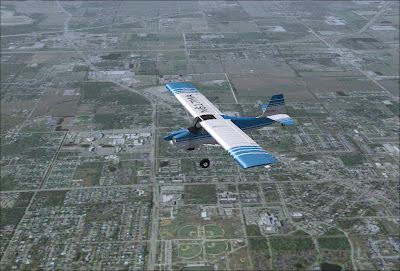
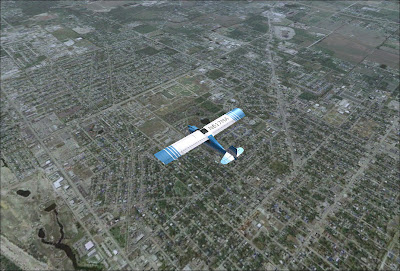
If you are like me you have fantasized while using some of the popular online mapping services and have wondered why our flight simulator scenery could not look that good. Look again at the picture at the beginning of this article. No, it is not a photo of a real Beaver flying over "Going to the Sun Road" in Glacier National Park. That is FSX using Tileproxy to browse those satellite images we are all so familiar with the aircraft in FS9 or FSX. In effect that is exactly what Christian Buchner has done with Tileproxy. He has converted our planes to satellite image browsers and folks the effect is jaw droppingly amazing. Finally, you can fly over your town and pick out your house just as if you were flying the local flying club Cessna. It works and it works amazingly well.
Christian Buchner said, "The idea for Tileproxy came after I had purchased FSX and wasn't quite happy with the default terrain. My computer couldn't handle the high detail settings (despite it being a dual processor machine). So at first there was just this idea: Is it possible to get satellite terrain into the simulator? "
Christian is an electrical engineer who has had an interest in computers since the Commodore 64 days. After that he graduated to an Amiga but a lightning strike roasted it. That is when he switched to a PC. He has enjoyed Microsoft Flight Simulator in all of its versions. While also working on his masters thesis he came up with one pet project (in 6 weeks of time) that would record streaming videos off the Internet He got a job that involved applications that streamed media over the Internet. While working in that field Chris lived and worked in the United States and still has a fondness for San Diego.
He is now back in Germany working at a small mobile communications company that writes simulation software which emulates the internals of radio communications networks in real time. Chris says it is very challenging and he gets to work with some very nice people. Chris tells me that they speak English in the office most of the time and I had trouble with German after three years of studying it. He now lives in Karlsruhe, Germany near the French border.
Here is a screen shot taken while flying my Glasflugel Libelle over Mt. Whitney in California. The experience with Tileproxy is breath taking. You can see that Chris was successful in achieving his dream to load satellite imagery into the flight simulator. I had to fly a Libelle there since I actually owned an H-201 Libelle and Lone Pine, California is one of my favorite places. It was a delightful plane to fly and now that I have sold it and no longer fly using FSX with Tileproxy is almost as good.
So, how does Tileproxy work? After you set it up which simple involves running an installer, you setup a configuration file to tweak some of the settings. Ed Truthan has made it easy by publishing a Tileproxy User Guide site where you can download a configuration file that is already setup. This is the part that gives most users trouble so many thanks to Ed for his nicely done website and for making the files available.
Once you have the configuration file setup, all explained on Ed's site, you start Tileproxy and it connects to the chosen map service. You can choose any of the popular services by selecting them in the configuration file. Tileproxy makes the connection and then waits for you to start FS9 or FSX with a "Ready for takeoff." Start the sim and wait for the imagery to load. You will have to wait longer than usual while thousands of scenery tiles are loaded and converted into scenery but once that has finished be prepared for an amazing experience. Now we at Freeflow really think our scenery is a huge improvement over the default and it is but the experience with Tileproxy makes you think that this is what flight simulation should be like.
But before you try it yourself watch the demo video on YouTube
or this one flying over Santiago, Spain:
or view some of the screenshots over at the Avsim forum here . You'll see a lot of activity there and those of us that have used Tileproxy share an excitement that is refreshing in the flight simulator world. You can download Tileproxy at http://sourceforge.net/projects/tileproxy/
Don't think you need a super machine to run it because mine is only a single core AMD 2700 machine with one gig of RAM. You will need a fast broadband connection to handle the imagery downloads.
We are finally getting our blogging capability underway here at FS-Freeflow. This is going to be my place to talk about unusual things and interesting projects that I have seen while browsing the net and reading email. I want to get my introduction out of the way with this post. I don't want to clutter up the blog with a sticky bio that will just take up screen real estate so I have decided to do it this way. I suppose if anyone wants to read this later when it is archived they can just dredge it up and go from there. So, here we go:
Robert T. "Bob" Brown III was born in Sumter, South Carolina in 1940. He fished, sailed, and explored the lakes, rivers, and streams of the state as a boy. Bob graduated from Edmunds High School in Sumter and then received a BS degree in physical geography from the University of South Carolina. He attended the Naval Officer Candidate School in Newport, Rhode Island and was commisioned in 1964. After spending four years at sea traveling the world he left the military and worked at a regional agency in Florida managing their computer technology. Bob is a licensed pilot in single engine aircraft and gliders. He started freelance writing after becoming interested in the Brown family history. The family stories told by family members provide endless subjects for writing projects. Bob says that there is a lifetime of work remaining on this topic alone but his interests include many other topics including fiction. He lives with his wife Barbara in their solar powered home in West Palm Beach, Florida. You can learn more at http://www.bbbrown.com